A Robotic Hand Rehabilitation Glove can help people practice grasping, releasing, and finger movement after injury or illness. Yet choosing one is not just a matter of comparing sleek designs. The right device should fit the person, the therapy plan, and the setting where practice will happen.
Consider a patient seated at a kitchen table, trying to lift a lightweight cup. Does the glove support that task, or only guide a repeated finger curl? Check its size range, assistance levels, comfort, setup time, and cleaning requirements. Ask how therapists can adjust exercises and track progress. Small details matter. A tight strap can discourage daily use.
Rehabilitation robotics researcher Hermano Igo Krebs is a recognized voice in this field. I cannot verify a direct quotation from him on selecting hand gloves, so I will not invent one. A cautious, non-verbatim principle consistent with rehabilitation robotics is: “Choose technology that supports meaningful practice and fits the person’s needs.” That is a selection guideline, not a quotation attributed to Krebs.
This guide compares practical features, clinical suitability, usability, and support. It also notes an important limitation: no glove works equally well for every user. A device may look promising in a demonstration yet feel tiring after ten minutes. Review the evidence, ask qualified clinicians about individual needs, and test the glove when possible. The best choice is not necessarily the most advanced one. It is the one a person can use safely and consistently, with professional guidance.
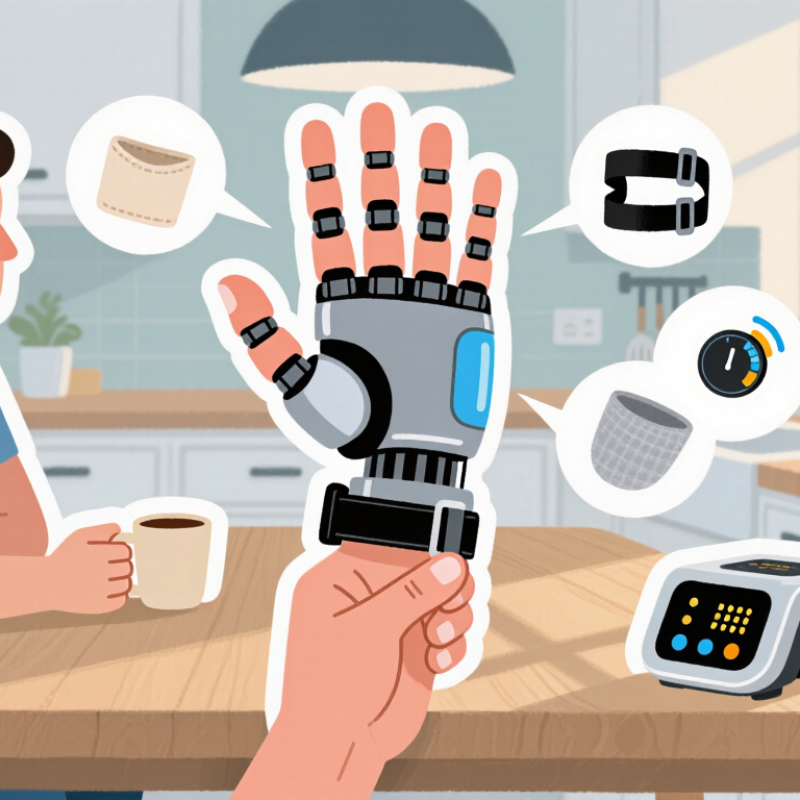
Before choosing a robotic hand rehabilitation glove, identify which movements are difficult and why. Note whether the challenge involves opening the hand, bending particular fingers, grip strength, or coordination. Record when it happens: holding a cup, fastening a button, or picking up a coin. Small details count.
Set goals around useful tasks, not device features. “Move better” is hard to measure; “pick up a lightweight cup with less assistance” is clearer. A therapist can help assess range of motion, sensation, strength, and fatigue, then match practice to the person’s abilities. Goals should be realistic and revisited as function changes. Progress may be uneven. That is normal, though it can be frustrating.
Check whether the glove supports the movements the person needs to practise and whether they can put it on comfortably. Fit matters: fingers should align with the moving parts, and straps should not cause pressure or rubbing. Consider how much help is needed to set up and operate the device. During early use, watch for discomfort, skin changes, or unusual fatigue, and pause if they occur. A careful assessment may still miss something; adjust the plan with a qualified rehabilitation professional rather than pushing through.
Robotic hand gloves differ in how they support movement. Soft pneumatic gloves use air-filled chambers to help bend or straighten fingers. Cable-driven designs pull tendons with small motors, while simpler gloves may provide passive support without powered movement. Each feels different. Check the glove’s weight, finger alignment, and how easily it can be put on. A bulky device may be difficult to use when hand sensation or shoulder strength is limited.
Assistance mechanisms matter just as much. Some gloves follow preset movements; others respond to sensors that detect an attempt to move. Sensor-triggered support can make practice feel more interactive, but detection may be less reliable with very weak or irregular signals. A clinician can help assess which movement pattern and assistance level fit the user’s goals. More assistance is not automatically better. A feature list can look convincing, yet daily comfort may matter more.
Tips: Try the glove while seated at a table, and check whether each fingertip stays comfortably aligned. Ask how assistance levels change and what happens if a session feels tiring. Look for clear cleaning instructions and adjustable sizing. Keep expectations realistic; progress can vary, and a device should not replace professional guidance. Some details are easy to overlook.
A robotic hand rehabilitation glove should fit like a supportive tool, not a tight cast. Measure palm width and finger length with the hand relaxed, then compare them with the device’s sizing guide. Check whether each finger can enter its sleeve without twisting. A glove that pulls the fingertips sideways may cause discomfort and limit useful movement.
Hand compatibility matters as much as size. Look for adjustable finger straps, a wrist closure, and settings that accommodate different ranges of motion. Stiff fingers, swelling, or limited wrist movement can make a standard fit unsuitable.
Tips: With the glove off, note where your fingertips rest and whether the wrist strap sits flat. Try a short session first. Stop if you feel pinching, numbness, or unusual pressure, and ask a rehabilitation professional to reassess the fit. Even careful measuring can miss a small pressure point.
A robotic hand rehabilitation glove should support movement without forcing the fingers into uncomfortable positions. Check that each finger has room to bend and that straps do not press hard against the knuckles. Soft lining helps, but heat and sweat can still build up during a session. Try the glove while seated, and inspect the skin afterward. Redness, numbness, or pain means the fit or assistance level needs attention.
Safety depends on more than padding. Look for clear instructions, adjustable assistance, and a way to stop movement quickly. A clinician should help set the range of motion, especially when sensation or muscle tone is limited. The Cochrane review of upper-limb electromechanical training after stroke included 45 studies and 1,619 participants. It reported potential benefits, but the findings cover different devices; they do not establish that every glove is effective or suitable.
Ease of use matters when practice happens often. Can the user put it on with one hand? Are the controls readable, and can settings be changed without navigating confusing menus? The World Health Organization estimates that 2.4 billion people worldwide could benefit from rehabilitation, underscoring the need for usable tools. Still, convenience should not replace supervision. I would test a short session first, then ask the user what felt awkward; that detail can be easy to miss in a product demonstration.
| Evaluation Dimension | Priority | What to Check | Why It Matters | Evidence or Questions to Request |
|---|---|---|---|---|
| Clinical suitability | Essential | Confirm that the device’s intended use and supported movements match the user’s rehabilitation goals and current abilities. | Needs vary with the cause and severity of hand impairment. A glove should be selected with guidance from a qualified rehabilitation professional. | Ask the clinician to review the intended use, movement options, contraindications, and treatment plan. |
| Movement limits and force control | Essential | Check whether finger movement, speed, and assistance can be adjusted, and whether the system limits movement when resistance or discomfort occurs. | Adjustable assistance can help accommodate different levels of movement. A device should not force a painful or unsafe range. | Request a demonstration of settings, movement limits, and how the device responds if the hand resists or the user reports pain. |
| Emergency stop and manual release | Essential | Locate the stop control and confirm that the user or caregiver can quickly stop operation and remove the hand if needed. | Clear, accessible stopping and release procedures are important if discomfort, a malfunction, or an unexpected movement occurs. | Ask to test the stop and release procedures during a supervised demonstration. |
| Fit and sizing | High | Check the sizing method, fit across the hand and fingers, and whether straps or supports can be adjusted without creating pressure points. | A poor fit may cause discomfort, restrict circulation, or make assistance less consistent. | Request the sizing guide and confirm how to check fit, skin condition, and circulation before and after use. |
| Materials and skin contact | High | Review the materials that contact the skin, cleaning instructions, and whether liners or removable covers are available. | Skin sensitivity, sweating, and hygiene needs can affect comfort and the practicality of regular use. | Ask how to clean and dry the glove, whether parts are removable, and what to do if irritation develops. |
| Comfort during a session | High | Try the device for a supervised session, checking pressure, heat, noise, weight, and ease of hand positioning. | Comfort can influence whether the user can complete the recommended sessions safely and consistently. | Ask about session duration guidance, rest periods, and signs that mean the session should be stopped. |
| Donning and doffing | High | Assess how easily the glove can be put on and removed, especially for users with limited grip or one-handed assistance needs. | Complex setup can make independent use difficult and may increase the need for caregiver support. | Have the user and, if applicable, caregiver try the setup using the device’s written instructions. |
| Controls and feedback | High | Check that buttons, display, instructions, and feedback are understandable and accessible to the intended user. | Clear controls can reduce setup errors and help users recognize the selected mode and device status. | Ask whether the controls can be operated by the user or caregiver and whether instructions are available in an accessible format. |
| Power and charging | Medium | Review battery or power requirements, charging time, expected operating time, and what happens if power is interrupted. | Power needs affect where and when the device can be used. Users should know how to stop and remove the device if power fails. | Request the operating and charging instructions, battery-care guidance, and power-interruption procedure. |
| Cleaning and maintenance | Medium | Check which parts can be cleaned, what products are permitted, and how often inspection or servicing is recommended. | Following the manufacturer’s care instructions helps maintain hygiene and identify wear or damage before use. | Request written cleaning, inspection, storage, and service instructions before purchase or trial. |
| Training and support | High | Confirm that setup training, troubleshooting guidance, and a contact for technical support are available. | Training helps users and caregivers understand safe operation and recognize when professional advice is needed. | Ask who provides training, what support is available after setup, and how faults should be reported. |
| Documentation and regulatory status | Essential | Review the intended-use statement, user manual, safety warnings, and applicable regulatory documentation for the country of use. | Regulatory requirements differ by location and device type; documentation helps clarify the device’s permitted use and limitations. | Request the current user manual and verify applicable registration or authorization through the relevant local regulator. |
Note: This checklist is for comparing device features, not for diagnosing or prescribing treatment. Selection, fitting, and use should be guided by a qualified healthcare professional. Stop use and seek professional advice if pain, unusual swelling, skin damage, or persistent numbness occurs.
Reviewing Clinical Support, Training, and Maintenance
A robotic hand rehabilitation glove should fit the care plan, not just the hand. Ask whether a rehabilitation clinician can assess range of motion, skin condition, sensation, and daily goals before use. The glove may support repeated finger movements, but it does not replace individual clinical judgment. Look for clinical evidence relevant to the user’s condition and stage of recovery. Ask how progress is measured and who can adjust settings when comfort or movement changes. Small details matter: cuff pressure, finger alignment, and an easy-to-reach stop control.
Training should cover supervised fitting, safe removal, and what to do if pain, numbness, or swelling occurs. Caregivers need practice too. A printed guide helps, but live coaching can reveal awkward movements a manual might miss. Maintenance matters just as much. Check cleaning instructions, inspect seams and cables, and ask how batteries, sensors, and replaceable parts are serviced. Confirm technical support availability before choosing. Even a good routine can be skipped on busy days; plan for that.
Soft pneumatic gloves use air chambers. Cable-driven gloves pull tendons with motors. Passive designs offer support without powered movement. Each feels different.
Some gloves follow preset movements. Others respond to sensors detecting attempted movement. Sensor support may be less reliable with very weak or irregular signals.
Try it seated at a table. Check fingertip alignment, strap pressure, and whether the glove is easy to put on. Bulky devices may be awkward.
Fingers should bend without force. Straps should not press hard on knuckles. Check the skin afterward. Redness, numbness, or pain needs attention.
Look for adjustable assistance, clear instructions, and a quick stop control. A clinician should help set movement limits, especially with reduced sensation.
No. A review included 45 studies and 1,619 participants, with potential benefits across different devices. It does not confirm every glove suits every user.
Training should cover fitting, removal, and symptoms that require stopping. Inspect seams and cables. Confirm cleaning instructions and technical support.
Keep a simple log of session length, comfort, and skin changes. Try the user’s actual chair and table. The demo can look smooth; daily use may feel different. If symptoms worsen, pause and contact the care team.
Choosing a Robotic Hand Rehabilitation Glove begins with understanding the user’s rehabilitation needs, current hand function, and practical goals. Consider whether the priority is assisted movement, repeated exercise, or support for specific hand and finger motions. Compare how different glove designs provide assistance, then check that the device fits comfortably and can be adjusted to accommodate hand size, mobility, and any changes during recovery.
Safety, comfort, and ease of use are also essential. Look for clear controls, suitable movement limits, and materials that are comfortable during regular sessions. Before choosing, review what clinical guidance, user training, and ongoing maintenance are available. A careful comparison of these factors can help users and caregivers select a glove that suits daily rehabilitation routines and supports consistent, appropriate practice.

MedTrack